If you want to send a few files once, quickly, under 1 GB in total, and you want the service itself to email the recipients, Mammutmail does the job: without an account it sends the notification to up to 20 recipients and keeps the files for 5 days. In every other case FileMv is the better default: when the link should not expire, when the file is bigger than 1 GB, or when you want folders, your own password, in-browser previews or embedding. On FileMv you can send up to 100 MB per file without an account and up to 5 GB per file with a free account, and the link never expires. In this article we compare the two free file sharing services point by point and show which one suits which case.
Two Hungarian services, two different ideas
When Toldacuccot closed in the summer of 2022, Mammutmail was left as the best-known domestic file transfer service; today it and FileMv are the two working standalone Hungarian-language file transfer services (the "óriáslevél" of Freemail and Citromail is a feature tied to those mailboxes). (If you are interested in Toldacuccot's story and the international alternatives, we collected them in our article on Toldacuccot shutting down.) Anyone searching "mammutmail or toldacuccot" today is really asking: which Hungarian site should I upload to now?
The two services think differently:
- Mammutmail is email-based. You enter your own email address and the recipients', pick the files, write a message, and the service emails the recipients a notification with the download link. The transfer is deleted automatically after 5 days.
- FileMv is link-based. You upload the file, get a link, and send it wherever you like: an email, Messenger, a forum, a document. The link never expires. With a free account FileMv can email the recipients too, but the link comes first.
Almost everything else follows from this: Mammutmail is built for a quick, disposable send, FileMv for a share that lives on.
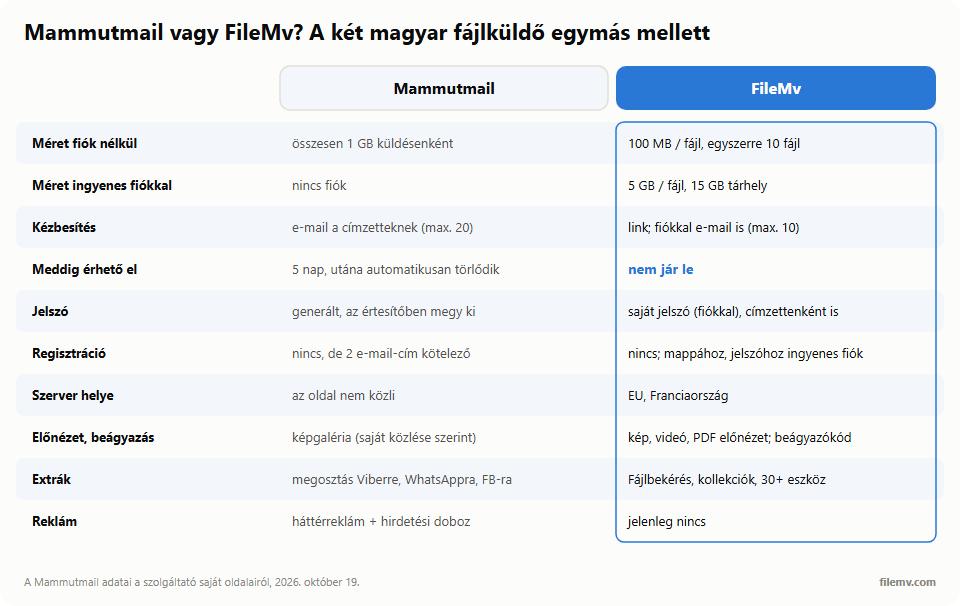
Mammutmail and FileMv side by side
| Mammutmail | FileMv | |
|---|---|---|
| Size limit without an account | up to 1 GB in total per transfer | 100 MB per file, up to 10 files at once |
| Size limit with an account | no accounts | 5 GB per file, 15 GB storage in total |
| Recipients, files | up to 20 recipients; several files on one link | without an account a separate link per file; with an account a folder on one link |
| How it reaches the recipient | Mammutmail emails them; you can also copy the link | you get a link and send it; with an account you can also email it, to 10 addresses at once |
| How long it stays available | 5 days, then deleted automatically | never expires |
| Password | generated by the service, sent in the notification | with an account, your own password; optionally a unique one per recipient |
| Registration | none, but the sender's and the recipient's email addresses are required | upload without an account; folders and passwords need a (free) account |
| Server location | not stated on the site | EU, France |
| Hungarian interface | yes (English too) | yes (English too) |
| Preview, embedding | by its own account, images can also be viewed in a gallery | images, videos and PDFs preview in the browser; embed codes for forums, HTML, Markdown |
| Extras | share to Viber, WhatsApp, Facebook, LinkedIn | File request, collections, custom link, 30+ browser tools |
| Ads | yes: full-page background ad and an ad box | none at the moment |
Where Mammutmail is better
A fair comparison includes the other side's strengths. Mammutmail is more convenient in three ways.
It sends the email for you, without an account. If the recipient expects the file by email, Mammutmail saves you writing a separate message: you type in their address and it sends the notification with your message and the download link. It does this without an account, to up to 20 recipients at once. On FileMv the same needs a free account, and works for at most 10 addresses at a time.
Several files, one link, no account. Mammutmail lets you put several files in one transfer, up to 1 GB in total, and the recipient gets a single link. On FileMv, without an account every file gets its own link; one shared link (a folder) needs an account there.
It disappears on its own. If you specifically want the file not to stay online, the automatic deletion after 5 days is an advantage: you don't have to remember it. On FileMv you cannot delete an upload made without an account afterwards, so upload sensitive material with an account instead, where you can delete it any time.
So if the task is "send three PDFs to five colleagues by email today, and next week nobody needs them", Mammutmail is perfectly fine.
Where FileMv is better
The link never expires
This is the most important difference. Mammutmail deletes the transfer after 5 days, so if the recipient is on holiday, opens the email late, or needs the file again a month later, the link gives them nothing. On FileMv the link never expires: what you put in a forum, a listing, a note or an old email will still work there. This was one of the pains of the Toldacuccot era too: old links died by the thousands.
Bigger files and folders
Mammutmail allows 1 GB in total per transfer; a 4K phone video or the photos from an event easily exceed that. On FileMv, with a free account a file can be 5 GB, your storage is 15 GB in total, and you can upload folders. You share the folder with a single link; the recipient browses it in the browser and can download it in one go as a ZIP. Our article on sharing lots of photos shows how best to do that.
A password you choose
Mammutmail's password is generated and goes to the recipient in the same notification as the link. On FileMv (with a free account) you set the password yourself, so you can send the link and the password through different channels — the link by email, the password by text message, say. If you email the share, you can also ask for a unique password for every recipient. A password-protected share never appears in search engines.
Viewable, not just downloadable
On FileMv's share page the recipient can view images, videos and PDFs in the browser without downloading them; iPhone HEIC photos get a preview too. For images you also get ready-made embed code (BBCode, HTML, Markdown), so you can put the picture into a forum or a blog as a clickable image. The share page never displays a photo's GPS location.
Private by default, no ads
New shares on FileMv are link-only by default: only the people you send the link to can see them, and we tell search engines not to index them. At upload there is a "Show in search engines" checkbox, which is off by default. The servers are in the EU, in France, and FileMv currently shows no ads. Mammutmail's upload page carries ads: a full-page background ad and an ad box beside it.
Email, notifications and a custom link with an account
If you do want to send it by email, with a free account you can type up to 10 addresses into the Send by email field of FileMv's share dialog, with a personal message. You can ask to be notified when an invited recipient opens or downloads the file, and you can see who has opened it already. You can also give the share a custom link (for example filemv.com/s/portfolio), which looks much better on a business card or a slide.
What Mammutmail doesn't have
- File request: a password-protected upload link that others can use to send you files without an account, straight into your folder (Receiving files with File request).
- Collections: a public selection with a cover and description, for a portfolio.
- Browser tools: more than 30 free tools that work without uploading, such as the video compressor, HEIC to JPG, PDF merge or the QR code generator.
Which one when?
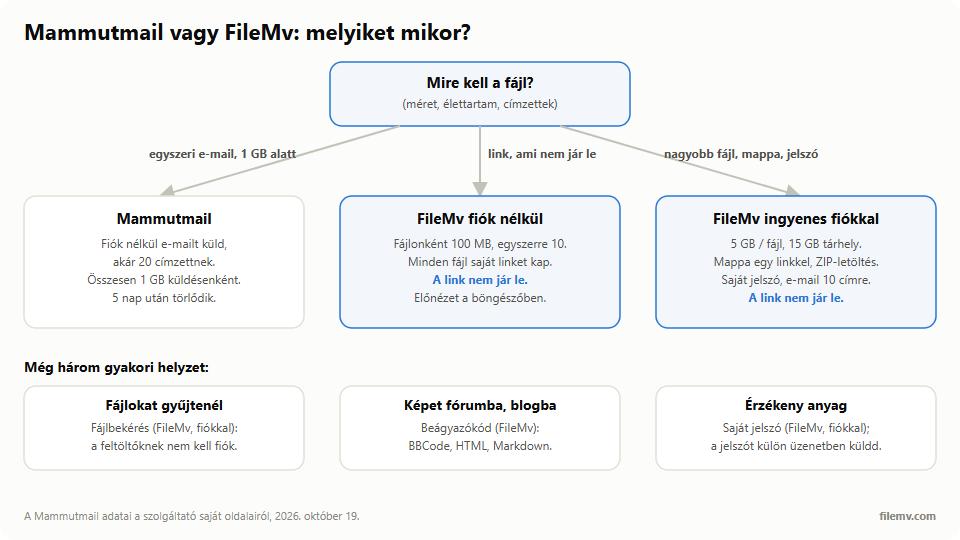
- A one-off email send, under 1 GB, without an account, to several recipients → Mammutmail.
- The file should still be there in a week, a month or a year → FileMv.
- A file bigger than 1 GB (video, raw photos, a large project) → FileMv with a free account, up to 5 GB per file.
- A few images or documents for a forum, a listing or a chat → FileMv, even without an account.
- Many files on one link, with the folder structure → FileMv with a free account.
- Sensitive material with your own password → FileMv with a free account; send the password in a separate message.
- Collecting files from others → FileMv File request.
If the file is too big for email and you are interested in the general methods too (compression, cloud, transfer services), our article on sending large files by email walks through them; we compared the international services among the WeTransfer alternatives.
Instead of Mammutmail: sending the same with FileMv
Without an account, for one or two files:
- Open the FileMv home page and drop the files on it (up to 10 at once, 100 MB per file).
- Wait for the upload and copy the link. Every file gets its own link.
- Put the link in your email or message as usual.
With a free account, if you also want to send an email:
- Sign up and upload the files to your Drive, into a folder if you like.
- Open sharing on the file's or folder's row; set a password if you need one.
- Type the recipients (up to 10) into the Send by email field, write a short message, and send it.
The difference from Mammutmail: the link still works five days later, and you stay in control of the share — you can revoke or delete it at any time.
In short
Mammutmail is good for a one-off email send: no account, up to 20 recipients, 1 GB in total, for 5 days. FileMv is the better default when the link should not expire, when the file is bigger, or when you want folders, your own password, in-browser previews, embedding or file requests: up to 100 MB per file without an account and up to 5 GB per file with a free one, on EU servers.