
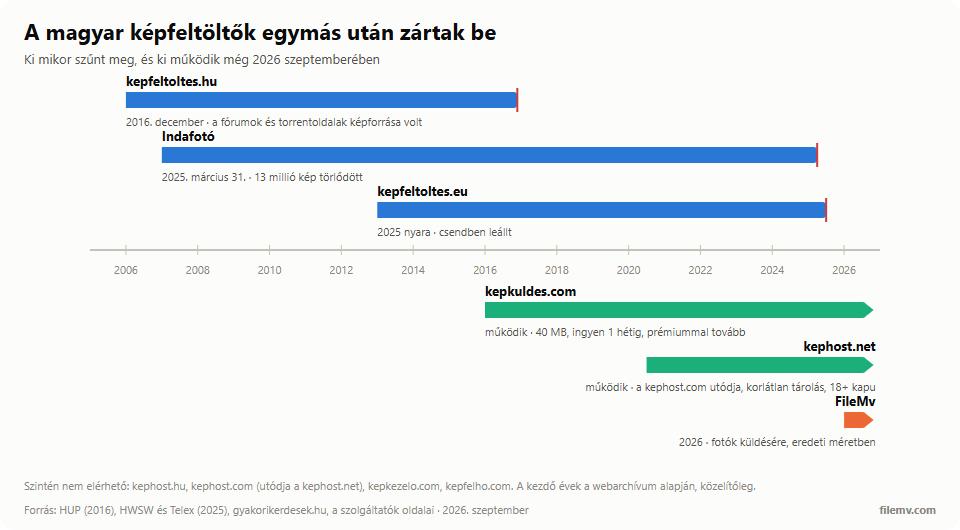
Most Hungarian image hosts are gone. kepfeltoltes.hu closed at the end of 2016, kephost.com and kepkezelo.com quietly, Indafotó on 31 March 2025, kepfeltoltes.eu in the summer of 2025. What actually works in September 2026 and can be used in Hungarian: kepkuldes.com and kephost.net as Hungarian image hosts, Postimages and ImgBB as international no-sign-up hosts with a Hungarian interface, and — for sending photos at original quality, with forum-ready thumbnail code too — FileMv. This article goes through who disappeared when, what is left, how large an image each accepts, how long it keeps it, and when you need a photo-transfer service rather than an image host.
What happened to the Hungarian image hosts?
For anyone posting on forums, classifieds or blogs around 2010, the image host was a basic utility: upload the picture, get a link or BBCode, paste it. The Hungarian players nearly all vanished within a decade, and the reason is always the same: image hosting is expensive (the picture stays for years and everyone who reads the forum loads it), while revenue was supposed to come from ads that users block.
kepfeltoltes.hu was the largest: it announced its closure in November 2016 and deleted the images in December, taking tens of thousands of images from Hungarian torrent sites and forums with it. Indafotó was a different kind of site, a community photo-sharing service, but it ended up in the same place: Indamedia switched it off on 31 March 2025 together with more than 13 million images. kepfeltoltes.eu simply stopped accepting uploads in the summer of 2025, without an announcement. The domains kephost.hu, kephost.com, kepkezelo.com and kepfelho.com no longer respond; the sole survivor of Képhost is kephost.net, launched in 2020.
The lesson the rest of this article carries: do not entrust anything important to a "stays forever" image host. If a picture matters, keep it on your own machine and in a cloud too — the image host is only where it is displayed.
What works in 2026
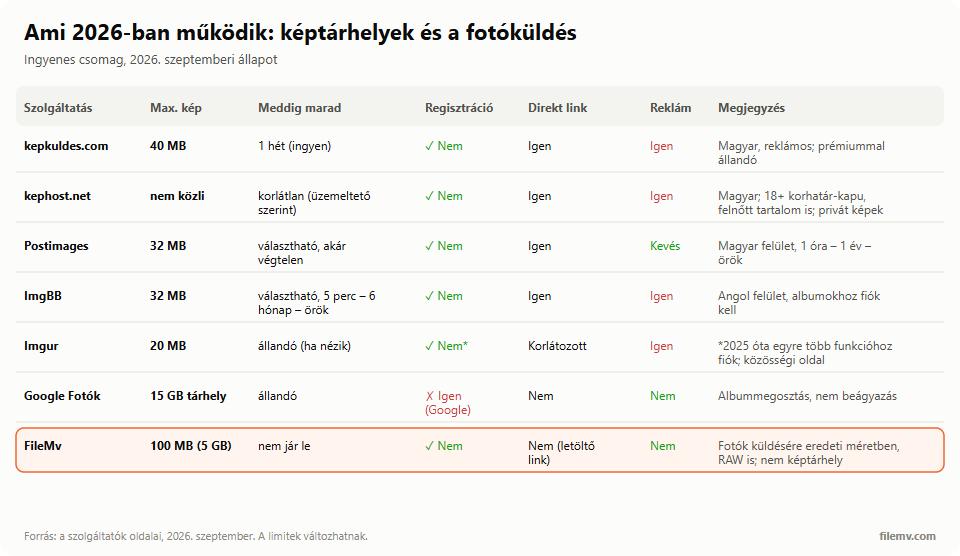
kepkuldes.com – the Hungarian image host without an age gate
Hungarian interface, no sign-up, images up to 40 MB, instantly gives a direct link, BBCode (full, medium, thumbnail), HTML and Markdown. Free uploads are deleted automatically after a week; if you want them to stay, you need a premium subscription. Ad-supported. Good for forums and one-off sharing; for an ad or a blog image that has to last months, only paid.
kephost.net – the successor of the old Képhost, unlimited storage, 18+ gate
After kephost.com closed, it relaunched in June 2020 as kephost.net, with a Hungarian interface and no sign-up, and it still works. Two things set it apart. One: according to the operator, uploaded images are kept indefinitely — no one-week expiry as at kepkuldes.com. Two: the site allows adult content, so every visitor is met by an 18+ age gate (the browser remembers the answer for 30 days). That does not matter for a forum image, but for a link sent to a client, a teacher or into an ad it can be awkward that the recipient first sees an "are you over 18?" question. Direct links and forum-embeddable code are available, and images can be set to private (link only). The maximum image size is not published; in practice the usual 10–20 MB JPGs upload without trouble.
Postimages – international, Hungarian interface, selectable expiry
No sign-up, up to 32 MB (96 MB with an account and payment), and at upload you choose whether it is deleted after an hour, a day, a week, a month, a year — or never. Direct link, BBCode and HTML are all there, ads are few. Switchable to Hungarian. If you are looking for a "kepfeltoltes.hu successor", this is the closest.
ImgBB – the same in English, with more embed options
No sign-up up to 32 MB, auto-deletion adjustable from 5 minutes to 6 months or off. Albums and managing your uploads require an account. English interface, ad-supported. It also has an API for developers who want to upload from their own site.
Imgur – the best known, but no longer "just an image host"
Uploads up to 20 MB; images nominally stay as long as they are viewed. Imgur has, however, turned into a social site in recent years: more and more features require an account, direct linking is restricted, and in 2023 it mass-deleted old account-less images. Fine for a meme or a Reddit post, risky for a long-lived forum image.
Google Photos – for sharing, not embedding
Not an image host in the classic sense: it gives no direct link to paste into a forum, but you can share an album with a link, and the 15 GB Google storage lasts a while. The most convenient option for family photos and events; not for forums. If you want to collect an event's photos from the guests, we compared the options in sharing and collecting event photos.
When do you need a photo-transfer service, not an image host?
Here is the most common misunderstanding. An image host is for a picture to live at a URL so you can embed it anywhere: a forum, a comment, a blog, an ad. It compresses, resizes, and anyone who knows the link sees it. If, on the other hand, you want a specific person to receive your photos, at original size, possibly hundreds at once, possibly as RAW or PSD — and without them vanishing by themselves after a few days — that is not image hosting, that is file transfer.
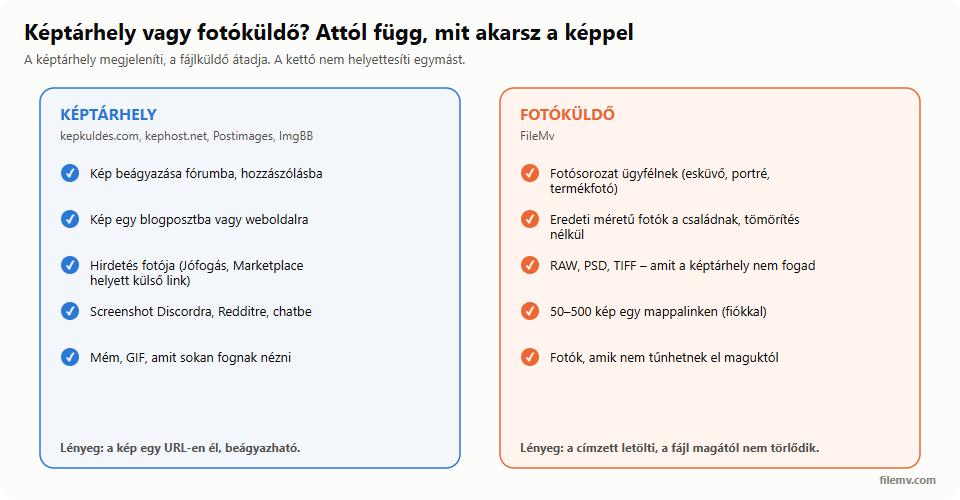
That is what FileMv's free image upload is for: drag the photos in, get a link, send it, the recipient downloads them in original quality, no sign-up. Without an account you can upload up to ten photos at once, each with its own link; to send a whole album as one link, put the pictures in a folder with a free account and share the folder. Free up to 100 MB per file without an account and up to 5 GB with a free account; the files never expire, nothing is deleted automatically, and they sit on servers in the European Union (France), which is not a side issue for client photos under GDPR. It does not compress, does not resize, and unlike image hosts it accepts RAW, TIFF and PSD too. You can paste it into a forum as well: after the upload you get ready-made BBCode, HTML and Markdown that show the photo as a clickable thumbnail opening the share page — step by step in embedding an image in a forum, and the basics in how to make a link for an image. You can put it in a forum too: after the upload you get ready-made BBCode, HTML and Markdown that show the photo as a clickable thumbnail, and the click opens the share page where the full-size picture can be viewed and downloaded.
So the practical rule: if the picture has to appear full-size inside the post or the article, use a classic image host (kepkuldes.com, kephost.net, Postimages, ImgBB). If a clickable thumbnail is enough, or you are sending original photos to a client, family, a print shop or an editor → FileMv. The same rule applies to video — see how to send a video by email.
A few things image hosts do not tell you
An uploaded image is public, even when "unlisted". Anyone with the link sees it; on kepfeltoltes.hu and the old Imgur it was routine for pictures believed private to surface. Do not put anything on an image host you would not show anyone — send it with a password-protected transfer link you can delete afterwards instead.
Most image hosts strip EXIF data (camera, settings, GPS position), which is good for privacy and bad for photographers. Transfer services like FileMv hand over the original file, EXIF included; if you do not want to pass on the GPS position, remove it first in the phone's or Lightroom's export settings.
Compression goes too: Imgur and most free hosts re-encode the JPG, and Google Photos saves "storage saver" quality by default. Never send to a print shop, an editor or a client from an image host.