
In 2026 WeTransfer's free plan requires an account to send, allows at most 10 transfers and 3 GB in total in any 30-day window, and the link lives for no more than 3 days. If you need more, the good news is that several free alternatives work without signing up: SwissTransfer up to 50 GB, TransferNow and Filemail up to 5 GB, Tresorit Send with end-to-end encryption, and FileMv with a link that never expires. This article looks at exactly what changed at WeTransfer, then puts the eight best alternatives side by side: size limit, link lifetime, sign-up, data location, and what the recipient actually sees.
What changed at WeTransfer?
WeTransfer was bought by the Italian company Bending Spoons in the summer of 2024, and the free plan has been narrowed in several steps since. TechCrunch reported in December 2024 that free transfers would be capped at 10 a month; WeTransfer's own help centre now states the exact rule: 10 transfers or 3 GB in total in any rolling 30-day window, whichever comes first. A single 3 GB transfer uses up the whole allowance.
The other rules that apply today (according to WeTransfer's own pages, September 2026):
- An account is required to send. WeTransfer creates a free one automatically on your first upload. Recipients still do not need to sign up.
- The link lives for at most 3 days. If the recipient is on holiday, the file is gone by the time they look.
- The free plan is for non-commercial use only, according to WeTransfer.
- The good news: password protection is now included on the free plan, and if you upload from the EU, your files are stored on EU servers.
In July 2025 a new clause in the terms of service also caused an outcry, because it seemed to let the company use uploaded content for machine learning. WeTransfer denied this and rewrote the disputed section, but that was when many creative users started looking for an alternative.
In short: if you send a few smaller files a month, WeTransfer still works for free. If you send regularly, move material over 3 GB, or want the link to still work a week later, it is worth switching.
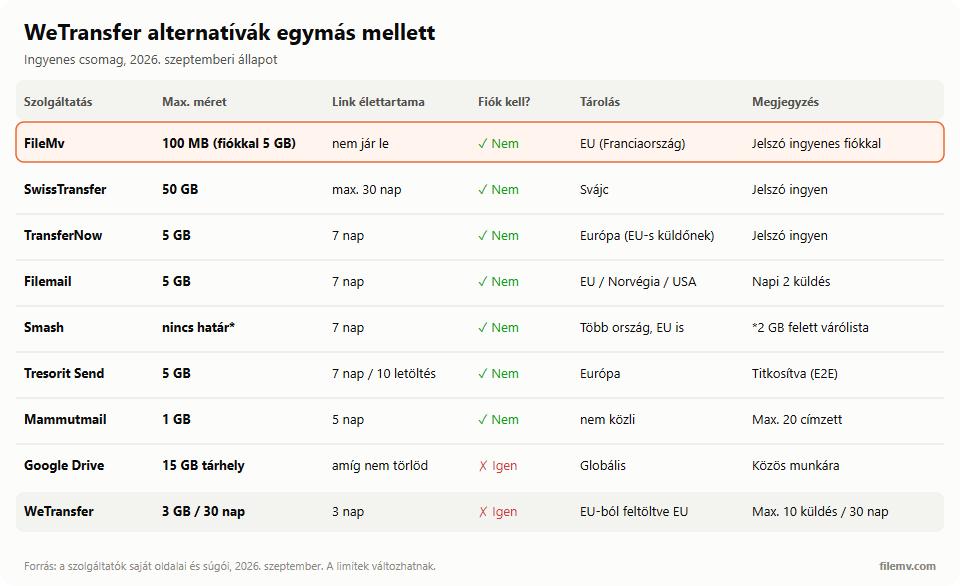
The 8 alternatives in one table
The figures come from the providers' own pages and help centres as of September 2026; we looked at the free plan everywhere.
| Service | Free size limit | Link lifetime | Account to send | Data location |
|---|---|---|---|---|
| FileMv | 100 MB per file, 5 GB with a free account | never expires | not needed (free account for 5 GB) | EU (France) |
| SwissTransfer | 50 GB | up to 30 days | not needed | Switzerland |
| TransferNow | 5 GB | 7 days | not needed | sender's region (Europe for EU senders) |
| Filemail | 5 GB, 2 transfers a day | 7 days | not needed | sender's region (EU/Norway/US) |
| Smash | no upper limit, queue above 2 GB | 7 days | not needed | several countries incl. EU |
| Tresorit Send | 5 GB | 7 days or 10 downloads | not needed (email address yes) | Europe (Tresorit's general policy) |
| Mammutmail | 1 GB | 5 days | not needed | not stated |
| Google Drive / OneDrive | 15 GB / 5 GB storage | until you delete it | required | global |
| WeTransfer (for comparison) | 3 GB per 30 days, max. 10 transfers | 3 days | required | EU when uploaded from the EU |
The alternatives one by one
1. FileMv – when you want the link to stay
FileMv is a free file sharing service built in Hungary: drag the file in, get a link. It works up to 100 MB per file without an account and up to 5 GB with a free account, and a free account also lets you put a password on the link. The key difference from the rest of the field: the file and the link never expire — nothing is deleted automatically — and storage is on servers in the European Union (France). The recipient lands on a share page where they can view images, PDFs and videos in the browser before downloading, without signing up.
When to pick it: when the recipient opens the link days or weeks later, when you put one link in several places (a quote, a portfolio, a project folder), or when you want a Hungarian interface. When not to: if you want to send a file over 100 MB without an account; that is what the free account or the services below are for.
2. SwissTransfer – the biggest free limit
The service from Swiss provider Infomaniak allows up to 50 GB without sign-up, stores files in Switzerland, lets you add a password for free and limit the number of downloads. The link is available for up to 30 days (according to Infomaniak's help centre, the default is 15 days, which can be extended through an offer sent by email). The recipient gets a download page; for packages over 10 GB the "download all" ZIP does not work and files have to be downloaded one by one.
When to pick it: handing over large video footage, raw photos, or a project of several tens of gigabytes in one go.
3. TransferNow – balanced, with a free password
French TransferNow works up to 5 GB, without sign-up, with a 7-day expiry, and password protection is included on the free plan. It picks the storage region from the sender's location — Europe for an EU sender. The recipient can preview images, video, audio and documents on the download page.
When to pick it: if you want a WeTransfer-like, simple experience without an account and without a monthly allowance.
4. Filemail – 5 GB, but two transfers a day
Norwegian Filemail allows 5 GB per transfer for free, without sign-up, and keeps files for 7 days. According to its help centre, the free service allows at most 2 transfers every 24 hours, and password protection is only on the paid plans. It stores files on its own hardware, by region (EU, Norway, US).
When to pick it: occasional large sends where the content is not sensitive.
5. Smash – no upper limit, but a queue
Smash, from Lyon, sets no upper size limit even for free, but above 2 GB transfers join a queue behind paying users. No sign-up, the link lives for 7 days, and a password is only on the paid plans. The recipient gets a download page and needs no account.
When to pick it: when the file is very large but not urgent, and no password is needed.
6. Tresorit Send – when encryption matters most
Tresorit started in Budapest in 2011 (Swiss Post now holds a majority stake), and Send is its free, no-account transfer service. It works up to 5 GB, and files travel end-to-end encrypted: the decryption key is in the link, and the server never knows it. The link lives for 7 days or 10 downloads, whichever comes first. No sign-up, but you have to enter your email address.
When to pick it: contracts, medical records, personal data — as long as the 7-day limit is not a problem.
7. Mammutmail – the simple Hungarian option
Mammutmail sends up to 1 GB, to up to 20 recipients, keeps files for 5 days, needs no sign-up, and can add an automatically generated password. The site does not say where its servers are. Hungarian interface, familiar to Hungarian recipients.
When to pick it: smaller files for Hungarian recipients, when 5 days is enough.
8. A cloud drive instead of a transfer service: Google Drive, OneDrive, Proton Drive
If the file stays around for longer, or you work on it together, a cloud drive is the right tool. A Google account gives 15 GB, but it is shared with Gmail and Google Photos; a Microsoft account gives 5 GB. A sharing link lives until you delete it, and with "anyone with the link" the recipient needs no account. Swiss, encryption-first Proton Drive starts at 2 GB, which you can grow to 5 GB by completing its tasks in the first 30 days; you can put a password and an expiry on the sharing link.
When to pick it: collaboration, or when your files already live there. For one-off sends it is more cumbersome: the file takes up your own storage, and the sharing setting is easy to get wrong.
Which one should you pick? A short decision guide
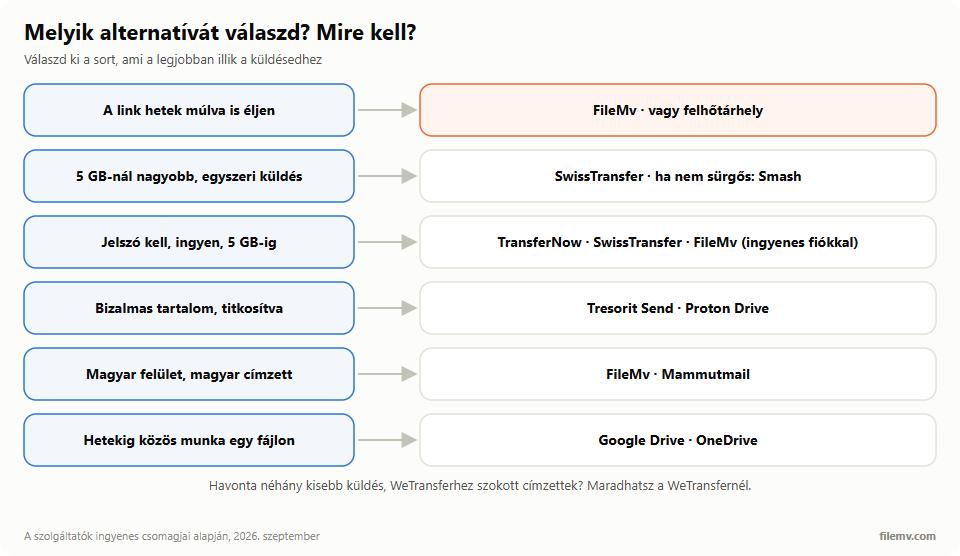
- The link must still work days or weeks later: FileMv, or a cloud drive.
- A one-off send over 5 GB: SwissTransfer; if it is not urgent, Smash.
- Password needed, free, up to 5 GB: TransferNow, SwissTransfer, or FileMv with a free account.
- Confidential content, encrypted: Tresorit Send or Proton Drive.
- Hungarian interface, Hungarian recipient: FileMv or Mammutmail.
- Working on the same file together for weeks: Google Drive or OneDrive.
- A few small sends a month, and your recipients are used to WeTransfer: you can stay with WeTransfer.
If you are looking for a Hungarian alternative because Toldacuccot shut down, we wrote a separate article about that. If you want to know when a plain email attachment is enough and when you need a link, read our guide to sending large files by email.
In short
WeTransfer's free plan today means an account, a 3 GB monthly allowance and 3-day links. For bigger files SwissTransfer is the most generous; if you need encryption, Tresorit Send; and if you want the link to stay so you never have to resend, try FileMv: up to 100 MB without an account, up to 5 GB with a free one, stored in the EU.