Most major email providers let you send messages of 20–25 MB, Microsoft 365 business mailboxes allow 35 MB by default, while the Hungarian free providers only take a few MB as a plain attachment. The real limit is smaller still, because an attachment grows by about a third when encoded, and the message also has to fit through the recipient's server. If you do not know where the message is going, stop thinking in attachments above 10–15 MB and send a link instead.
This page is a reference: one table showing how much each provider lets you send and receive as of September 2026, the chain rule and the encoding explained with a worked example, and an overview of the "giant mail" features that exist. Gmail's details (the Drive link, the mobile app, error messages) are covered in our Gmail attachment size limit article, and the five methods for sending a large file in our guide on sending large files by email.
The big table: send and receive limits in 2026
The numbers come from the providers' own help pages. Where a provider publishes no figure, or where we only found an older or unofficial source, we say so.
| Provider | Send (per message) | Receive | Above the limit |
|---|---|---|---|
| Gmail (personal) | 25 MB of attachments | 50 MB (encoded) | automatic Google Drive link |
| Google Workspace | set by the admin; Enterprise Plus: 50 MB | 50 MB; Enterprise Plus: 70 MB | Drive link |
| Outlook.com | 25 MB for the whole message¹ | not published | OneDrive link, up to 2 GB |
| Microsoft 365 / Exchange Online | 35 MB by default | 36 MB by default | admin can set 1–150 MB; OneDrive link up to 2 GB |
| Self-hosted Exchange Server | 10 MB by default | 10 MB by default | up to the admin |
| Yahoo Mail | 25 MB | 25 MB | no built-in option |
| iCloud Mail | 20 MB | 20 MB | Mail Drop: 5 GB, for 30 days |
| Proton Mail | 25 MB | 50 MB | – |
| GMX | FreeMail (gmx.net): 20 MB; gmx.com: 50 MB | not published separately | GMX Cloud sharing link |
| Zoho Mail (free) | 20 MB for the whole message | not published separately | Huge Attachments on paid plans only |
| Tuta (Tutanota) | 25 MB² | not published | – |
| Freemail | 5 MB per file, 10 MB per message² | not published | óriáslevél (giant mail): 1 GB, for one week |
| Citromail | 3 MB² | not published | giant attachment: 1 GB, 7 days / 10 downloads² |
| Telekom (t-online.hu, t-email.hu) | not published | not published | no new mailboxes sold since 1 September 2024 |
¹ Microsoft's Outlook.com help says 25 MB for the whole message; the desktop Outlook help says 20 MB for internet accounts (Outlook.com, Gmail). If you send from desktop Outlook, count on 20 MB.
² We could not reach a current official help page; the figure comes from the provider's earlier description or a public developer issue. For guidance only.
Mobile apps can impose their own limits too: for Microsoft 365 mailboxes, for example, the Outlook app for iOS and Android sends messages of at most 33 MB.
The chain rule: the weakest link decides
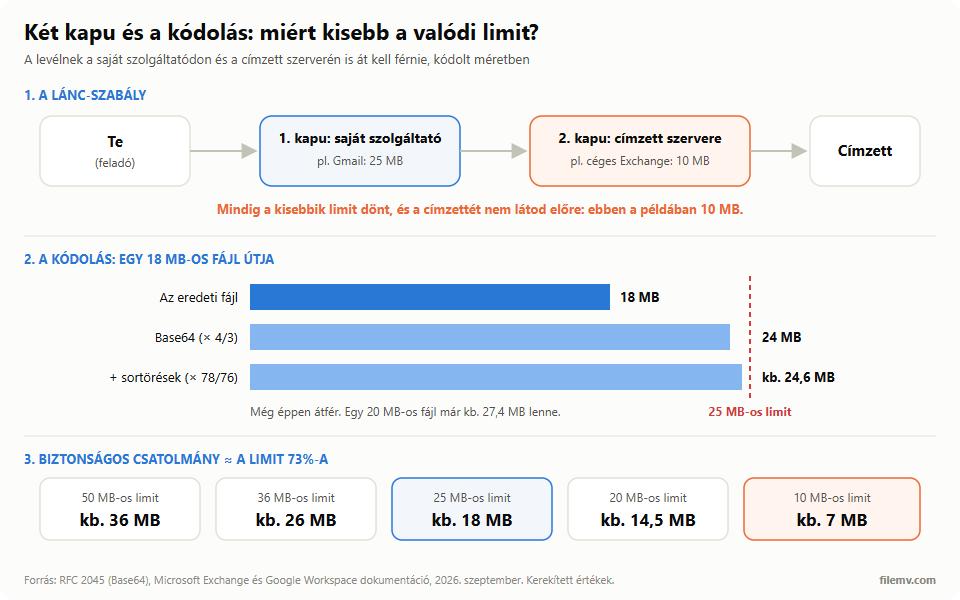
A message has to pass at least two gates on its way: your provider's when you send it, and the recipient's when it arrives. Each has its own limit, and the smaller one always wins. Microsoft's Exchange documentation says it in so many words: a message must be within the size limits of both the sender and the recipient.
That has three practical consequences:
- Your own limit is only the ceiling. Your company's Microsoft 365 may allow 35 MB, but a message that size will not arrive in a 20 MB iCloud mailbox.
- Corporate servers are often stricter. A self-hosted Exchange Server defaults to 10 MB for both sending and receiving, and at many companies nobody has changed it. Microsoft 365 defaults to 35/36 MB, but the admin can lower that too. When emailing an accountant, a law firm or a public body, plan for a limit somewhere around 10–25 MB.
- You cannot see the recipient's limit. You only find out from the bounce, typically with an error code starting "552 5.3.4" and text along the lines of "message size exceeds…".
Base64: why an 18 MB file becomes a 25 MB message
Email is a text format, so your mail client turns attachments into text with Base64 encoding. The standard (RFC 2045) turns every 3 bytes into 4 characters and breaks the encoded text into lines of at most 76 characters, each followed by a 2-byte line break. Together that adds about 37%. Microsoft's documentation counts 33% (without the line breaks); Google counts about 37% for its receiving limit.
A worked example for an 18 MB PDF:
- Base64: 18 MB × 4/3 = 24 MB
- Line breaks: 24 MB × 78/76 ≈ 24.6 MB
- Plus the message headers and text: a few tens of KB, so about 24.7 MB
That just squeezes through a 25 MB gate. A 20 MB file, however, becomes 27.4 MB — over the Yahoo, Outlook.com and iCloud limits.
Providers do not all measure the same way: Google and Microsoft explicitly count the encoded size, while Yahoo's help talks about the sum of the attached files. So the safe rule of thumb is: keep the attachment to about 73% of the strictest limit you might hit. At 25 MB that is about 18 MB, at 20 MB about 14.5 MB, at 10 MB about 7 MB.
Giant mail and friends: the built-in large-file features
Almost every mail service offers some way past the limit, but they work differently and carry different risks:
- Gmail → Google Drive link. Automatic above 25 MB; the file takes up your 15 GB of storage, and the sharing setting decides who can open it (details in the Gmail article).
- Outlook.com and Microsoft 365 → OneDrive link. According to Microsoft, OneDrive links do not count towards the message size, and the linked file can be up to 2 GB. A free Microsoft account comes with 5 GB of cloud storage, which fills up quickly.
- iCloud Mail → Mail Drop. Attachments of up to 5 GB; the recipient has 30 days to download them, and they do not count against your iCloud storage (the Mail Drop storage limit is 1 TB). Works on Mac, iPhone, iPad and iCloud.com.
- Freemail → óriáslevél (giant mail). Automatic for files over 5 MB, up to 1 GB; the download link lives for a week.
- Citromail → giant attachment. Up to 1 GB; the file is kept for at most 7 days or 10 downloads.
- GMX → GMX Cloud link. You upload the oversized file to GMX's cloud storage and send a sharing link.
- Zoho → Huge Attachments. Paid plans only: from 250 MB to 1 GB depending on the plan.
- Mammutmail. Not a mail provider but a Hungarian file-transfer service: up to 1 GB, up to 20 recipients, files kept for 5 days.
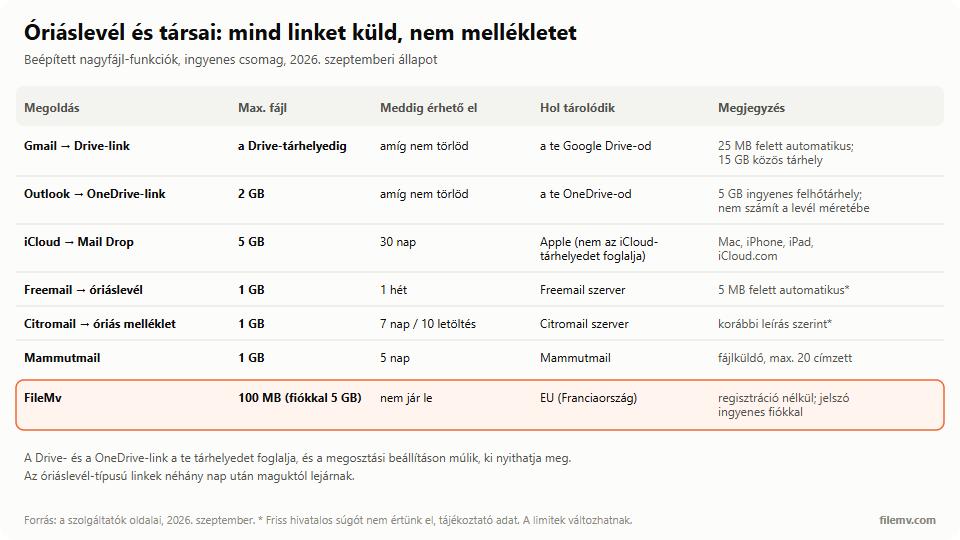
What they have in common: they all send a link, not an attachment. The differences are where the file is stored (in your storage or at the provider), how long the link lives, and whether the recipient needs an account.
What to do above the limit
Check the file size and decide from the table:
- You are a few MB over, and it is an Office file: compress the pictures inside it (Word and PowerPoint: File → Compress Pictures). Zipping it again barely helps, because a .docx, .xlsx or .pptx is already a ZIP package inside.
- The file is bigger than 15–20 MB, or you do not know the recipient's server: send a link. A file-transfer service does not burden your mailbox, and the recipient needs no account. FileMv works without signing up, up to 100 MB per file, and up to 5 GB with a free account. The file sits on servers in the European Union (France), the link never expires — nothing is deleted automatically — and with a free account you can put a password on it.
- You are emailing a business with strict mail settings: ask in advance how large a message they accept, or send a link from the start — a link gets through regardless of the file's size.
Step-by-step instructions for each method (compression, cloud, giant mail, splitting) are in our guide on sending large files by email, and a comparison of file-transfer services in our article on WeTransfer alternatives.
In short
The limit on the label is only the starting point: encoding makes the message about a third larger, and the recipient's server has a say too. With a 25 MB limit, about 18 MB is safe; with business recipients, often 7–15 MB. Anything bigger is best sent as a link. FileMv's free file sharing works without an account, up to 100 MB per file (5 GB with a free account), and the link never expires — nothing is deleted automatically.